JVillage
—
 JohnyMuffin on December 11th, 2022


JVillage is a land claim management plugin made by
JohnyMuffin, exclusive to RetroMC.
It aims to be a replacement for Towny, another land claim management plugin.
Under this plugin, villages and nations are managed.
- JVillage/Admin commands exists for server staff and owners who use it.
- Source code on GitHub: https://github.com/retromcorg/JVillage
Features
- Players can own, assist, and be a member of multiple towns.
- Towns intially cost $1000 to create.
- - Refunds will be issued upon unclaiming chunks or deleting a town.
⚠️ Warning: Deleting a village with more than 2 claims will give only $1000 back, and not the total price of its additional claims.
Therefore, unclaiming every chunk in the village and then deleting will prevent losses related to this.
In addition, per-chunk claim refunds are only valid for 7 days from the initial claim; beyond that timeframe, claims can still be removed, but refunds won't be given.
- Nations, which can be created at a cost of $50000 via
/nation create, are a tier above towns and possess their own banks, warps and internal chat (/n chat). - For $10, 20 chunks can be claimed - the latter number increases by 20 with each town member - up to 50 people, resulting in 1000 chunks.
- Going past that limit (be it 20 for 1-person village or 1000 for a 50-member one) will result in each chunk becoming more expensive to claim by $0.01, starting from $10, up to and including $50.
- Titles are applied to villages based on member count. (Settlement for 1 member, Village for 10 and so on till Megacity for >100)
- Outpost claims cost $500 each.
Differences between and migration from Towny
- Players have to run
/v join <village>if they want to join one and are invited by a village's assistant or owner. - Players have to pay in-game money to claim land.
The migration from Towny to JVillage happened between December 25 2022 to January 1 2023, and during that time period:
- Towny data was migrated with some caveats.
- Players who have didn't connect to RetroMC for an extended period of time didn't have their towns migrated
- - These towns were transferred to a placeholder account until the owner or a member requests the town's ownership via a ticket on the Discord server.
- Claims that were created before a certain date couldn't be refunded.
Usage
/v is used in place of /village for brevity.
See /v help for the full command lists .
Use /v deposit <village> <amount> to give a specified village a specified money amount.
Each chunk claim costs $10 and $500 for outposts.
/v claim to claim and /v claim outpost to claim as outpost.
Player commands

/v info)
/v list)

/v info <village>- Shows village info/v list <village>- Shows village members/v activity [village|here|top]- Shows how active a village is (see Activity)/member <username>or/resident <username>or/res <username>or/player <username>- Shows the villages a specified player is currently in/v map- Shows a map of the claims around you/v join [village]- Joins a village (village assistants or owner needs to invite)/v invites- Shows the village invites you have pending/v deny [village]- Declines a village invite/v leave [village]- Leaves a village/v select [village]- Selects which of your villages other commands act on
- -
/v select=/v s
/v autoswitch [on/off]- Autoswitch the selected town to another one upon entering its territory
- -
/v autoswitch=/v switch=/v as
/v balance- Shows a specified village's balance/v deposit <village> <amount>- Deposit a specified amount to a specified village/v chat [message]- Sends a message to every online member of your selected village/v spawn- Teleport to village spawn
- -
/v spawn=/v home
/v warp [name]- Teleport to a village warp
Village assistant commands
/v claim- Claims the chunk the you are currently on/v claim ac- Toggles auto-claiming which will claim chunks as you walk
- -
ac=a=auto=autoclaim
/v claim rect [chunk radius]- Claim a rectangular radius of chunks around your current location
- - Maximum radius is 6 chunks. Each chunk is charged at the village's current claim price (see Features).
/v claim outpost- Claims the chunk you are on as a detached outpost, away from your existing claims
- - Costs $500.
/v unclaim- Unclaims the chunk the you are currently on/v unclaim auto- Toggles auto-unclaiming which will unclaim chunks as you walk/v withdraw <village> <amount>- Withdraw a specified amount of money from a specified village
- - Requires the
assistant_can_withdrawflag; village owners can always withdraw.
/v invite [username]- Invites the selected player to your town/v kick [username]- Kicks the selected player from your town/v setwarp [name]- Sets a village warp at your location
- - Costs $500. Warp names may be up to 20 characters.
/v delwarp [name]- Deletes a village warp
- - Refunds the $500 the warp cost to set.
Village owner only
/v create [name]- Create a new village
- - Costs $1000 per village. Village names may be up to 20 characters.
/v setowner [username]- Promote a village member to owner/v promote [username]- Promote a member to assistant/v demote [username]- Demote a member from assistant/v setspawn- Set the spawn point for your village/v rename [name]- Rename your village/v delete [village]- Deletes your village
- - See the warning under Features about unclaiming first to avoid losing money.
Village flags

These are settings for villages - only village owners can modify these.
/v flags [flag] [true/false|on/off]- Toggle a setting
- -
/v flags=/v flag
/v flag list- List settings & their toggled status
assistant_can_withdraw- Allow village assistants to withdraw money deposited into the village they're inmobs_can_spawn- Allow mobs to spawnrandom_can_alter- Allow non-members to modify blocksmob_spawner_bypass- Bypasss themobs_can_spawnflag so monster spawners can summon mobsmembers_can_invite- Allow members (non-assistants) to invite other players to a villageprevent_mushroom_spread- Disable mushrooms from spreadingprevent_ice_snow_melt- Disables the melting of ice blocksnation_members_can_alter- Allow members of other towns belonging to the same nation as the current town to modify blocks
Nations
Nations are a group of villages sharing a bank, warps and a private chat.
/n is used in place of /nation for brevity. Run /nation on its own for the full command list.
Nation member commands
/nation info [nation]- Shows nation info (owner, village count, balance, warps)/nation activity [nation|top]- Shows how active a nation is (see Activity)/nation list- Lists the villages in a nation/nation chat [message]- Sends a message to every online player in your nation/nation balance- Shows the nation's bank balance
- -
/n balance=/n bal
/nation deposit [amount]- Deposits money into the nation bank
- -
/n deposit=/n dep
/nation warp [name]- Teleport to a nation warp/nation invites- Shows the nation invites your selected village has pending
Village owner commands
These act on your currently selected village, so use /v select first if you own more than one.
/nation create [name]- Creates a nation with your selected village as its first member
- - Costs $50000.
/nation join [nation]- Takes your selected village into a nation it has been invited to/nation deny [nation]- Declines a pending nation invite/nation leave- Removes your selected village from its nation
Nation owner only
/nation invite [village]- Invites a village to your nation/nation kick [village]- Removes a village from your nation
- - The last remaining village cannot be kicked; delete the nation instead.
/nation rename [name]- Renames your nation/nation setowner [player]- Transfers ownership of the nation to another player/nation withdraw [amount]- Withdraws money from the nation bank
- -
/n withdraw=/n with
/nation setwarp [name]- Sets a nation warp at your location
- - Costs $1000.
/nation delwarp [name]- Deletes a nation warp/nation delete- Deletes the nation
-
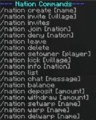
/nation

Activity
As of 29 August 2026, villages build up an activity score that measures how much is actually going on inside their claims.
Scores are tracked per week. A nation's score is simply the total of the villages currently in it.
/v activity [village]- Shows a village's score for this week, its all-time total, and a short weekly history/v activity here- Shows the score of the village you are currently standing in/v activity top- Lists the most active villages this week/nation activity [nation]- Shows a nation's score/nation activity top- Lists the most active nations this week
- -
/v actand/n actare shorthand for the above.