User:Noggisoggi/beevo mobile
Jump to navigation
Jump to search
BetaEvolutions on Android-based devices. Under construction & slightly shabby. Slightly more friendly.
This is based on the guide hosted on Angel Aura Amethyst's wiki; we thank them for their work:
https://wiki.angelauramc.dev/wiki/going_further/CUSTOM-MC.html
This section merely serves as a supplement to that guide, so please reference it when following this section.
- If you haven't already, get Angel Aura Amethyst and log into your account.
- PojavLauncher and the like will still work for this guide.
- Due to the way that Android stores files for certain apps, you need to use alternative file managers for easier management.
- In place of MiXplorer, you can use Material Files; the latter will be used.
- For easier file management, it's recommended that you move the required files to your desktop/laptop computer.
- In Amethyst, create a new profile by opening the profile menu at the bottom of the screen, then selecting Create new profile → CREATE VANILLA PROFILE → Select
b1.7.3as the version, and save. - Launch the game once, and quit.
- Open Material Files, open the ☰ (hamburger menu) at the top left (or top-right in some locales) → + Add storage... → External storage, and inside of that file manager, re-select ☰ → Amethyst → USE THIS FOLDER and allow permission.
- You will have a directory named "files" in ☰; tap and hold it to rename (if you wish).
- Go to that directory →
.minecraft→versions→ duplicate theb1.7.3folder and rename the copy tobetaevoor similar, rename the files inside that directory in the same way, then move it to yourDownloadfolder.- You may need to refresh the file manager (tap and hold, then swipe downwards) to update the file names.
- Connect your Android device to your desktop/laptop computer and move
betaevoto a working directory (the desktop, for example); from here, you'll need to use switch to your desktop/laptop computer.
-
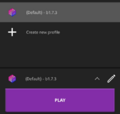 Location of the create new profile button on Amethyst.
 -
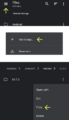 Steps to add Amethyst's data folder to Material files and copy the b1.7.3 folder.


- Download the BetaEvolutions client jar mod.
- Edit the
betaevo.json, and remove the part that has"downloads:{"client"...}(as seen in that guide) - Edit
"id": "b1.7.3"to"id": "betaevo", and save. - Unpack the jar in that same folder, and unpack the BetaEvo client jar mod, then copy the contents of BetaEvo into that unpacked b1.7.3 folder, and overwrite.
- Delete
META-INFin that folder. - Select all the files in that folder, and compress them as a zip. (With something like 7-Zip).
- Move the
betaevoback to your Android device, re-open Material Files, move that folder into the Amethyst folder.minecraft→versions. - Re-open Amethyst, edit your instance, change the version to
betaevo, launch and pray it works.

If it doesn't, pester
 Noggisoggi in a ticket.